The technical writing portfolio of Kayce Basques.
This is a comprehensive, roughly chronological list of everything I've created as a technical writer.
Talks
- Improving Response Rates. My lightning talk from Write The Docs 2018 (Portland). I discuss using experimentation and the scientific method to improve engagement on "was this page helpful?" widgets.
Open source contributions
Docusaurus
Corrily (August 2021)
I helped Corrily with their docs for a little less than 1 month. I worked 21 hours per week. I also created a sample app for them. Here is how the docs looked before I worked with the team.
- Homepage (PDF)
- Basics
- Quickstart guide (PDF)
- Setup (PDF)
- Users
- Pricing
- Payment gateways
- API reference
Google (2015 to 2021)
Tools
- docs-migration-tool. A tool that I wrote to automate most of the migration from the old developer.chrome.com site to the new one. The old site used templated HTML, whereas we wanted Markdown on the new one. I used Puppeteer to scrape the old site's HTML content and convert it to Markdown. The tool also did lots of normalization transformations on the content.
- chrome-devrel-review-bot. A GitHub bot that did automated content quality reviews on https://web.dev pull requests.
Push notifications
Note: I was the sole author on the latest iteration of these documents. If you see 2 or more authors, it means I based the content off of earlier work that other people had created.
- Overview (PDF)
- Codelab: Build a push notification server (PDF)
- Codelab: Build a push notification client (PDF)
Chrome DevTools
Overviews:
Tutorials:
- Console Tutorial (PDF)
- Workspaces Tutorial (PDF)
- Network Tutorial (PDF)
- JavaScript Debugging Tutorial (PDF)
- Page Load Optimization Tutorial (PDF)
- Get Started With Analyzing Runtime Performance (PDF)
- CSS Tutorial (PDF)
Guides:
- Using DevTools Features Without Opening DevTools (PDF)
- Override The User Agent String (PDF)
- Track Which Element Has Focus (PDF)
- Simulate Mobile Devices (PDF)
- Remote Debug Android Devices (PDF)
- Simulate Device Orientation (PDF
- Override Geolocation (PDF)
- Run Snippets (PDF)
- Breakpoints Guide (PDF)
- Blackbox Chrome Extension Scripts (PDF)
- Disable JavaScript With Chrome DevTools (PDF)
- Force Print Preview Mode (PDF)
References:
- Keyboard Shortcuts Reference (PDF)
- Accessibility Reference (PDF)
- JavaScript Debugging Reference (PDF)
- Performance Analysis Reference (PDF)
- CSS Reference (PDF)
Release Notes:
- Chrome 80 (PDF)
- Chrome 79 (PDF, Video)
- Chrome 78 (PDF, Video)
- Chrome 77 (PDF, Video)
- Chrome 76 (PDF, Video)
- Chrome 75 (PDF, Video)
- Chrome 74 (PDF, Video)
- Chrome 73 (PDF, Video)
- Chrome 72 (PDF, Video)
- Chrome 71 (PDF, Video)
- Chrome 70 (PDF, Video)
- Chrome 68 (PDF, Video)
- Chrome 67 (PDF, Video)
- Chrome 66 (PDF, Video)
- Chrome 65 (PDF, Video)
- Chrome 64 (PDF, Video)
- Chrome 63 (PDF, Video)
- Chrome 62 (PDF, Video)
- Chrome 61 (PDF, Video)
- Chrome 60 (PDF, Video)
- Chrome 59 (PDF, Video)
- Chrome 58 (PDF)
Workbox
- Workfox For NPM Scripts Tutorial (PDF)
- Workbox For Webpack Tutorial (PDF)
- Workbox For Gulp Tutorial (PDF)
Security
Lighthouse
- Critical Request Chains (PDF)
- Defer Unused CSS (PDF)
- Enable Text Compression (PDF)
- Estimated Input Latency (PDF)
- First Contentful Paint (PDF)
- First CPU Idle (PDF)
- First Meaningful Paint (PDF)
- Avoids Enormous Network Payloads (PDF)
- Has Multiple Page Redirects (PDF)
- JavaScript Bootup Time Is Too High (PDF)
- Keep Server Response Times Low (PDF)
- Minify CSS (PDF)
- Offscreen Images (PDF)
- Optimize Images (PDF)
- Properly Size Images (PDF)
- Speed Index (PDF)
- Preload Key Requests (PDF)
- Serve Images In Next-Gen Formats (PDF)
- Time To Interactive (PDF)
- Optimize Images (PDF)
- User Timing Marks And Measures (PDF)
- Excessive DOM Size (PDF)
- Cache Policy (PDF)
- Address Bar Matches Brand Colors (PDF)
- Contains Content When JavaScript Is Not Available (PDF)
- Has A Viewport Meta Tag (PDF)
- Page Load Is Fast Enough On Mobile (PDF)
- Redirects HTTP Traffic To HTTPS (PDF)
- Uses HTTPS (PDF)
- Avoids Application Cache (PDF)
- Avoids console.time() (PDF)
- Avoids Date.now() (PDF)
- Avoids document.write() (PDF)
- Avoids Mutation Events (PDF)
- Avoids Old CSS Flexbox (PDF)
- Avoids Requesting Geolocation Permissions On Page Load (PDF)
- Avoids Requesting Notification Permissions On Page Load (PDF)
- Displays Images With Incorrect Aspect Ratios (PDF)
- Includes Libraries With Known Vulnerabilities (PDF)
- Links To Cross-Origin Destinations Are Unsafe (PDF)
- Prevents Users From Pasting Into Password Fields (PDF)
- Some Insecure Resources Can Be Upgraded To HTTPS (PDF)
- Uses HTTP/2 (PDF)
- Uses Passive Event Listeners (PDF)
- Document Does Not Have A Meta Description (PDF)
- Document Doesn't Have A Title Element (PDF)
- Document Doesn't Have A Valid hreflang (PDF)
- Document Doesn't Have A Valid rel=canonical (PDF)
- Document Doesn't Use Legible Font Sizes (PDF)
- Document Uses Plugins (PDF)
- Links Do Not Have Descriptive Text (PDF)
- Page Is Blocked From Indexing (PDF)
- robots.txt Is Not Valid (PDF)
- Tap Targets Are Not Sized Appropriately (PDF)
Quantified Code (2014)
Quantified Code was a Berlin-based startup. Their main product was an automated code analysis tool for Python codebases. I wrote over 100 guides for their companion site, The Little Book Of Python Anti-Patterns. The purpose of the companion site was to share their knowledge of Python best practices while also driving traffic to their automated product. E.g. their sales pitch was "rather than trying to remember all of these best practices, we have an automated tool that can do it for you." Subject matter experts at Quantified Code gave me a list of topics to write about. If I recall correctly, each topic only had a one-line description. I researched and drafted each guide myself. The subject matter experts reviewed my guides.
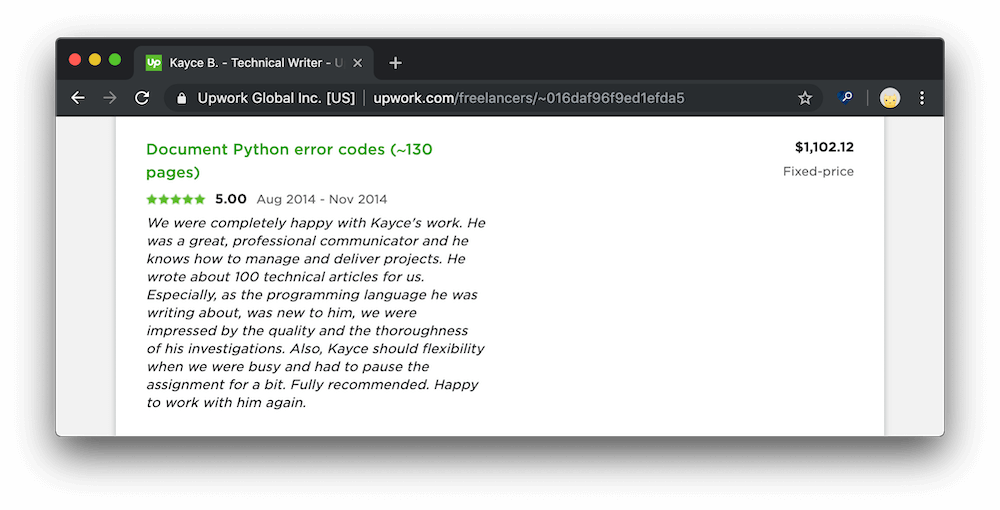
Note that the list below is not complete. It looks like some of the guides were deleted over time. See my commit history for the full list of contributions.
- Method has no argument (PDF)
- Explicit return in __init__ (PDF)
- Method could be a function (PDF)
- __exit__ must accept 3 arguments (PDF)
- Use of exec (PDF)
- Using the global statement (PDF
- Indentation contains mixed spaces and tabs (PDF)
- Comparison to none (PDF)
- Comparison to true (PDF)
- Test for object identity should be is not (PDF)
- Do not compare types, use isinstance (PDF)
- Indentation contains tabs (PDF)
- Assigning lambda to a variable (PDF)
- Using wildcard imports (PDF)
- Future import is not the first statement (PDF)
- Bad except clauses order (PDF)
- Bad first argument given to super (PDF)
- Missing argument to super (PDF)
- Access to a protected member (PDF)
- else clause on loop without a break statement (PDF)
- Using an unpythonic loop (PDF)
- Returning more than one variable type from function call (PDF)
- Not using items to iterate over a dictionary (PDF)
- Not using zip to iterate over a pair of lists (PDF)
- Using key in list to check if key is contained in list (PDF)
- Not using else in a loop (PDF)
- Not using setdefault to initialize a dictionary (PDF)
- Not using get to return a default value from a dictionary (PDF)
- Using map or filter where list comprehension is possible (PDF)
- Not using defaultdict (PDF)
- Not using named tuples when returning more than one value (PDF)
- Not using explicit unpacking (PDF)
- Not using unpacking for updating multiple values at once (PDF)
- Not using with to open files (PDF)
- Asking for permission instead of forgiveness when working with files (PDF)
- Not using a dict comprehension (PDF)
- Putting type information in a variable (PDF)
- Implementing Java-style setters and getters (PDF)
Arrayent (2012 to 2015)
Arrayent was an internet of things startup. I was the sole technical writer in the company. This was my first full-time technical writing job. I wrote developer documentation for an embedded API as well as a REST API, in addition to end-user documentation for a couple of web applications. I even hacked together a custom XSLT stylesheet to convert our Doxygen-generated reference documentation to more reasonable HTML. I also migrated the company's documentation from Microsoft Word to a website. I used Sphinx to generate the site and stored the source code on BitBucket. I deployed the site to Heroku. I don't think I set up an automated deployment system because running the command to deploy to Heroku was trivial. In addition to managing all of our customer-facing documentation I also managed our SDKs, which we sent out to prospective customers.
Embedded Developer Docs:
- WICED DevKit Tutorial (PDF)
- Marvell DevKit Tutorial (PDF)
- FAQ (PDF)
- Firmware Developers Guide (PDF)
- Embedded API Reference (PDF)
- ACA Datasheet (PDF)
- Data Types Reference (PDF)
- Device Types Guide (PDF)
- Troubleshooting Guide (PDF)
Web Developer Docs:
- Regular Alerts Guide (PDF)
- Push Notification Alerts Guide (PDF)
- SMS Alerts Guide (PDF)
- Regular Expressions Alerts Guide (PDF)
- Scheduled Alerts Guide (PDF)
- Web Service API Guide (PDF)
- System API Reference (PDF)
- End User API Reference (PDF)
- Anonymous API Reference (PDF)
- API Codes Reference (PDF)
Web App User Docs: